

| Thread Review (Newest First) |
| Posted by khamulx - 06-16-2015, 08:41 AM |
|
Ok i had partypoker in polish language - i installed english version and it works perfectly now! But still problems with this widged, im turning it off in settings, but its still visible  Nevermind, it works! 
|
| Posted by SaT_Admin - 06-16-2015, 08:16 AM |
(06-16-2015, 07:19 AM)khamulx Wrote: http://i.gyazo.com/0d59782b1d1950ab00ed7654c3f2cdf5.png Did you edit that image in any way? All it says for the title is "partypoker: Hol" ? Is "Hol" your screenname? Where did you download this from? Not www.partypoker.com ? (06-16-2015, 07:19 AM)khamulx Wrote: I did not change anything As mentioned on the iPoker help page: http://www.stackandtile.com/sat/help/ipoker You need to turn off the Widget bar |
| Posted by khamulx - 06-16-2015, 07:19 AM |
 I did not change anything Maybe its problem with this "widget" thing on ipoker? Maybe it change something?[settings] table_width=640 table_height=468 total_slots=6 slot1x=0 slot1y=0 slot2x=640 slot2y=0 slot3x=1280 slot3y=0 stack_slot=0 newtables_slot=grid move_to_grid=never oldtables_duration=3 oldtables_slot=0 scan_mode=DWM play_mode=tile slot4x=0 slot4y=475 slot5x=640 slot5y=475 slot6x=1280 slot6y=475 activate_most_urgent=1 activate_table_under_mouse=0 highlight_active_win=1 move_mouse_to_most_urgent=0 left_click_detection=1 stack_when_clicking_call_or_bet=0 stack_table_at_end_of_hand=0 drag_drop_swap_slots=0 minimize_to_tray=0 show_table_count_while_running=0 show_session_timer=0 move_888_popups=1 close_bovada_popups=1 stars_include_logged_in_as=0 notify_new_tables=1 notify_old_tables=0 notify_keep_in_grid=0 notify_ignore_table=0 notify_move_to_grid=0 notify_end_of_hand=0 notification_duration=3 hotkeys_fire_on_release=0 allow_action_hotkeys_on_ignored_tables=0 click_bet_for_betsize_hotkeys=0 also_keep_in_grid_when_move_to_slot_x=0 fold_checkbox_setting=Fold + Check/Fold also_stack_table_for_betsizeX=0 focus_betbox=0 click_ftp_timebank=1 detect_hidden_windows=0 [general] show_walkthru=0 gui_x=1933 gui_y=499 last_tab= filename=6tablinggg.ini is_reloading=1 version=2.81 win_ver=6.1.7601 v=tr [sites] PokerStarsMercury_included_executable_path=C:\Program Files (x86)\PokerStars.EU\PokerStars.exe PokerStarsMercury_included_resized_table_width=640 PokerStarsMercury_included_resized_table_height=468 PokerStarsMercury_included_fold_color=0x244 PokerStarsMercury_included_call_color=0x241 PokerStarsMercury_included_bet_color=0x240 number_of_sites=3 included_sites=PokerStarsMercury,888PacificPoker,iPoker 888PacificPoker_included_executable_path=C:\Program Files (x86)\PacificPoker\bin\poker.exe 888PacificPoker_included_resized_table_width=640 888PacificPoker_included_resized_table_height=468 888PacificPoker_included_fold_color=0xcf7e05 888PacificPoker_included_call_color=0xda59 888PacificPoker_included_bet_color=0x782ff iPoker_included_executable_path=C:\Users\Hubert\AppData\Local\William Hill Poker\casino.exe iPoker_included_resized_table_width=640 iPoker_included_resized_table_height=471 iPoker_included_fold_color=0x989898 iPoker_included_call_color=0x939393 iPoker_included_bet_color=0x989898 [hotkeys] number_of_hotkeys=8 hotkey1action=Fold hotkey1key=F1 hotkey2action=Call hotkey2key=F3 hotkey3action=Bet 999 bb hotkey3key=F12 hotkey4action=Activate previous slot hotkey4key=F9 hotkey5action=Increase bet hotkey5key=F7 hotkey6action=Decrease bet hotkey6key=F11 hotkey7action=Bet hotkey7key=F5 hotkey8action=Activate most urgent table hotkey8key=F8 send_table_under_mouse=0 |
| Posted by SaT_Admin - 06-16-2015, 07:01 AM |
(06-16-2015, 04:19 AM)khamulx Wrote: http://i.gyazo.com/b0f3cd6fa2ca99c1e7be93161ae5b56d.png No sorry, I need it for the LOBBY window (06-16-2015, 05:31 AM)khamulx Wrote: Ive go one more problem, increase/decrease bet hotkey dont work properly on ipoker (williamhill). Decreasing work properly, but increasing wont Did you change any lines in your config to change the increment size for these hotkeys? Because in v2.80, I changed it so that these hotkeys simply click the +/- button on the iPoker table next to the slider. Can you click File->Current Layout and paste me everything? |
| Posted by khamulx - 06-16-2015, 05:31 AM |
|
Ive go one more problem, increase/decrease bet hotkey dont work properly on ipoker (williamhill). Decreasing work properly, but increasing wont
|
| Posted by khamulx - 06-16-2015, 04:19 AM |
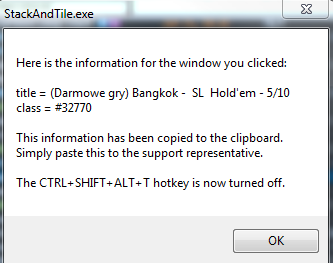
|
| Posted by SaT_Admin - 06-16-2015, 03:02 AM |
(06-16-2015, 01:44 AM)khamulx Wrote: I was trying both of them Yeah but thats not a good solution, because some features won't work. You're sure PartyPokerModern failed? Can you use the menu Help -> Diagnostic -> Get Window Title and paste me the results for the Party Lobby window? |
| Posted by khamulx - 06-16-2015, 01:44 AM |
|
I was trying both of them But i probably resolved this problem, i just "created" new site by wizard and its working now
|
| Posted by SaT_Admin - 06-15-2015, 11:57 PM |
| You should be using the "PartyPokerModern" site, not "PartyPokerClassic". Try that |
| Posted by khamulx - 06-15-2015, 07:17 PM |
|
It looks like this http://i.gyazo.com/f2f9662c1d49d5e907549a0db0d4b7a0.png |
| This thread has more than 10 replies. Read the whole thread. |